
7 Best Minecraft Shaders for Java in 2026
The best Minecraft shader is the one that matches your visual goal and stable frame-rate budget—not simply the pack with the most effects.
This best Minecraft shaders guide compares packs by the decisions players actually face: how far the look moves from vanilla, how much GPU headroom it usually needs, whether it works as an everyday survival preset, and how easy it is to tune. One benchmark number cannot represent every world, resource pack, resolution, loader, or graphics card.
All recommendations are for Minecraft Java Edition. Shader packs normally run through Iris or OptiFine; Bedrock Edition uses a different graphics pipeline. Back up important worlds, change one setting at a time, and compare packs in the same location, weather, resolution, and render distance.
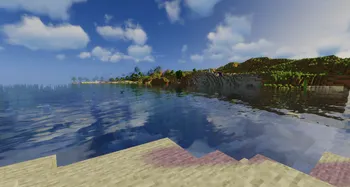
Best Minecraft shaders compared at a glance
Treat the performance column as a relative starting point, not a guaranteed FPS result. Resolution, render distance, drivers, mods, resource packs, and the selected preset can change the outcome dramatically.
| Shader | Best for | Visual character | Relative GPU load | Start here |
|---|---|---|---|---|
| Sildur's Vibrant | Big visual upgrade | Colorful, reflective, cinematic | Medium to very high | Medium preset |
| Complementary Reimagined | Balanced daily play | Polished, coherent, configurable | Medium to high | Default profile |
| BSL Shaders | Screenshots and building | Warm light, soft clouds, stylized color | Medium to high | Default, then lower shadows |
| Photon Shaders | Natural light enthusiasts | Physical-looking sky, light, weather | High | Default at moderate render distance |
| MakeUp Ultra Fast | Better FPS | Clean, customizable, restrained | Low to medium | Performance profile |
| Sildur's Enhanced Default | Vanilla-style survival | Familiar textures with better depth | Low to medium | Fast preset |
| Sildur's Basic | Older or integrated GPUs | Simple shadows and color control | Low | Fast preset |
If your priority is low-end performance, use the dedicated low-end PC guide rather than choosing from visual reputation alone. If your priority is one Sildur family, use its download page to compare current presets and verified files.
The roundup includes competing projects because “best” is a comparison intent. Sildur's Shaders Wiki is not affiliated with those projects, and external links go to author-controlled listings rather than mirrored ZIP files.
Seven shader packs worth comparing
Each pick wins a different job. The useful question is not which pack has the most features, but which trade-off you will still enjoy after several hours of survival, building, or exploration.
1. Sildur's Vibrant Shaders
Vibrant is the strongest first choice when you want Minecraft to look unmistakably transformed. Reflections, volumetric light, wet surfaces, richer skies, and six performance tiers make it flexible enough for screenshots or regular play.
- Lite through Extreme-VL presets
- Current 2.01 release supports Iris and OptiFine
- Distant Horizons and Voxy support listed by the project
2. Complementary Reimagined
A strong daily-driver option for players who want a cohesive modern look without pushing every effect toward maximum drama. Its broad settings range makes it a useful reference point when comparing packs.
- Balanced color and lighting
- Deep configuration options
- Strong fit for survival and varied biomes
3. BSL Shaders
BSL remains popular for warm sunlight, soft clouds, colorful skies, and screenshot-friendly scenes. It suits builders who prefer a stylized but readable world.
- Warm, recognizable color grading
- Good subject separation for builds
- Many community presets and tutorials
4. Photon Shaders
Photon is aimed at players who notice sky behavior, weather, water, and the relationship between direct and indirect light. The richer lighting model asks for more GPU headroom.
- Natural-looking atmosphere and weather
- Excellent outdoor exploration scenes
- Better suited to modern GPUs
5. MakeUp Ultra Fast
The practical choice when you want shader depth without turning the game into a screenshot benchmark. Modular settings make it easier to disable expensive effects and keep the parts you value.
- Performance-oriented design
- Modular effects
- Useful for modest systems and high refresh rates
6. Sildur's Enhanced Default
Enhanced Default improves shadows, water, clouds, and atmosphere while preserving Minecraft's original visual identity. It is comfortable for long survival sessions.
- Fast and Fancy presets
- Small visual learning curve
- Good bridge between vanilla and full shaders
7. Sildur's Basic Shaders
Basic focuses on lightweight shadows, color, cross-processing, depth of field, and motion blur variants. Choose it when stable play matters more than reflections or complex volumetrics.
- Very small download
- Fast, Fancy, DoF, and Motion Blur variants
- Best starting point for integrated graphics
Choose the look you want to keep
A shader can look spectacular in a sunset screenshot and still be uncomfortable in caves, rain, the Nether, or a busy base. Test readability as seriously as beauty. Watch how the pack handles dark blocks, glass, water, signs, particles, hand-held items, and rapidly changing weather.
Vanilla-friendly packs preserve block recognition and usually need less adjustment. Cinematic packs create stronger mood but may require exposure, shadow, bloom, fog, or saturation changes. Natural-light packs reward outdoor exploration yet can cost more performance.
- For survival: prioritize readable caves, stable water, and consistent day-night exposure.
- For building: prioritize color accuracy, shadow softness, glass, and material separation.
- For screenshots: prioritize skies, volumetric light, reflections, depth of field, and camera-friendly color.
- For multiplayer: prioritize stable frame time and visual clarity over maximum effects.
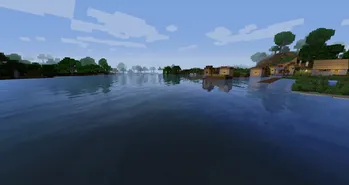
How to choose a shader without guessing
Use one clean test route and change one variable at a time. A ten-minute comparison is more reliable than switching packs in different worlds or weather.
- Confirm Java, loader, and game versionCheck the project page for your Minecraft release and use a compatible Iris or OptiFine build. Do not assume Bedrock instructions apply to Java.
- Set a frame-rate floorChoose the lowest frame rate you can accept during normal play. A pack that only feels smooth while standing still is not a stable choice.
- Test the same routeWalk through water, trees, a detailed base, a cave entrance, rain, and night. Keep render distance, resolution, resource packs, and mods unchanged.
- Lower expensive settings firstReduce shadow resolution and distance, volumetric quality, reflections, cloud quality, ambient occlusion, and depth of field before lowering everything.
- Keep two profilesSave a daily-play profile and a screenshot profile. This is usually more useful than forcing one preset to handle both jobs.
Best Minecraft shaders FAQ
What is the best Minecraft shader for most Java players?
Sildur's Vibrant Medium and Complementary Reimagined are sensible first comparisons. Choose Vibrant for dramatic color and light or Complementary for a more balanced presentation.
What is the best shader for a low-end PC?
Start with Sildur's Basic Fast, Enhanced Default Fast, MakeUp Ultra Fast, or Vibrant Lite. Use the low-end PC guide for a hardware-first decision.
Do Java shader packs work on Minecraft Bedrock?
No. Java shader packs made for Iris or OptiFine are not Bedrock shader packages. Bedrock uses a different rendering system.
Is Iris better than OptiFine for shaders?
Iris is often the simpler choice for modern Fabric performance stacks, while OptiFine remains useful for older installations. Use the loader supported by the pack and your other mods.
Can a shader damage a Minecraft world?
A shader changes rendering rather than world data, but crashes or incompatible mods can disrupt a session. Keep backups and test changes in a separate profile.
Where the pack facts came from
Version, compatibility, and feature statements were checked against author-controlled project pages on July 16, 2026. Download from those listings instead of third-party mirrors.
- Sildur's official downloads — Current Sildur pack versions and official project links
- Sildur's Vibrant Shaders on Modrinth — Presets, files, gallery, and compatibility
- Complementary Reimagined on Modrinth — Author-controlled project listing
- BSL Shaders on CurseForge — Author-controlled project listing
- Photon Shaders on Modrinth — Author-controlled project listing
- MakeUp Ultra Fast on Modrinth — Author-controlled project listing
Pick for your real play session
For a first test, compare Sildur's Vibrant Medium, Complementary Reimagined, and one performance-first option in the same world. Keep the pack that stays readable and smooth during ordinary play, then build a separate screenshot profile if you want heavier effects.
This site verified that Sildur's current releases remain Vibrant 2.01, Enhanced Default 1.19, and Basic 2.6 on July 16, 2026. No version or download-link change was required before publishing this guide.