
Sildur's Shaders for Low-End PCs
For Sildur's Shaders for Low-End PCs, follow a Sildur-focused path from the lightest Basic preset to Vibrant Lite, with hardware checks and repeatable FPS tuning.
Sildur's Shaders for Low-End PCs can work on modest Minecraft Java hardware, but the right preset matters more than the ZIP size. Basic Fast changes the least, Enhanced Default Fast keeps a vanilla-style scene, and Vibrant Lite adds stronger lighting at a higher GPU cost.
Use this branded low-end path to choose a first preset, confirm Iris or OptiFine is running, and test the same world before adding effects. The recommendation is based on stable frame time, not a single peak FPS number.
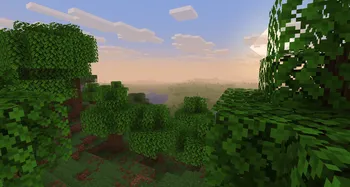
Which Sildur's shader is the safest first test?
For Sildur's Shaders for Low-End PCs, test Basic Fast first, then Enhanced Default Fast, and only then Vibrant Lite. This order keeps the hardware decision clear.
Sildur's Basic Fast
The lightest starting point for integrated graphics, old laptops, or modded instances that already use much of the frame budget.
- Use Fast for normal play; Fancy adds a little more visual weight.
- DoF and Motion Blur are specialist variants, not faster upgrades.
- If Basic Fast stutters, fix resolution, render distance, loader, or drivers before trying a heavier pack.

Enhanced Default Fast
Keeps Minecraft's vanilla style while adding better shadows, water, clouds, and atmosphere. It is the next step when Basic runs comfortably.
- Fast is the low-end preset; Fancy should be tested later.
- Usually easier to read in survival than a strongly stylized shader.
- A sensible option for modest dedicated GPUs and stronger integrated graphics.
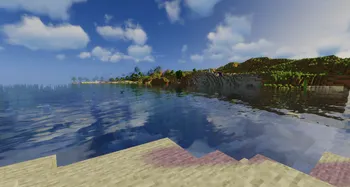
Vibrant Lite
Adds the strongest lighting transformation, but volumetrics, reflections, shadows, and post-processing make it the most demanding family here.
- Choose Lite first and leave Medium or higher for faster GPUs.
- Lower volumetric lighting and shadows before sacrificing every effect.
- Best for a dedicated GPU that still needs a conservative preset.
Match Sildur's preset to your GPU
These are conservative 1080p starting points, not guaranteed FPS promises. Mods, recording, high resolution, and long view distance need extra headroom.
| Typical hardware | Start with | Target | Move up when |
|---|---|---|---|
| Intel UHD / older integrated GPU | Basic Fast | 30-45 stable FPS | Frame time stays even at 8-10 chunks |
| Modern integrated GPU / entry dedicated GPU | Basic Fancy or Enhanced Fast | 45-60 FPS | Normal exploration has no repeated stalls |
| GTX 1050-class / modest dedicated GPU | Enhanced Fast or Vibrant Lite | 50-60 FPS | GPU usage leaves headroom for chunk loading |
| Stronger dedicated GPU but CPU-limited Minecraft | Vibrant Lite | Stable frame time | Lower render distance no longer changes GPU-bound scenes |
At 2560×1440 or a high-density laptop display, render scale can matter more than the preset name. Test 1920×1080 or a lower render scale before disabling every visual feature.
Do not compare results from a quiet indoor room with a forest, ocean, rainstorm, or long-distance view. The harder scene is the useful benchmark.
Tune Sildur's Shaders in this order
Change one group at a time and retest the same location. This makes it clear which option actually helps.
- Reduce render distance.Start around 8-10 chunks on a weak system. Chunk updates can cause stutter even when average GPU FPS looks acceptable.
- Lower shadow quality or resolution.Shadows are often one of the clearest wins while preserving the pack's style.
- Reduce volumetric lighting, reflections, and clouds.These matter especially in Vibrant Lite and weather scenes.
- Disable expensive presentation effects.Turn off depth of field, motion blur, lens flare, and heavy anti-aliasing when they do not serve normal gameplay.
- Check resolution and render scale.A high-resolution laptop panel can overwhelm an otherwise reasonable preset.
- Keep GPU headroom.Leave room for new chunks, mobs, rain, interfaces, and background apps.
How to test a low-end Sildur preset
Use the same world, location, weather, time of day, camera direction, render distance, and resolution for every comparison. Let chunks finish loading, then walk and turn through the scene.
Watch frame-time consistency as well as average FPS. Short repeated pauses can feel worse than a lower but steady number.
Test for several minutes in the activities you normally do: exploration, building, combat, farms, multiplayer, or modded dimensions. Record the lowest sustained range, not the highest number while standing still.
If every preset performs poorly, test a clean Iris and Sodium profile. A conflicting mod, outdated driver, wrong GPU assignment, or oversized resolution may be the real bottleneck.
Build a low-end Sildur setup you can repeat
Install the ZIP through Iris or OptiFine without unzipping it. In Minecraft Video Settings, choose a practical render distance and let the world finish loading before judging a preset. A still screenshot can look smooth while chunk streaming, rain, or a modded light source exposes the real bottleneck.
Before comparing packs, close overlays, keep the same resolution, and change one shader group at a time. If you record video or use a large modpack, leave extra GPU and memory headroom instead of tuning right up to the limit.
- Use a clean loader profile.Match the Minecraft version, Iris or OptiFine build, and shader ZIP before comparing performance.
- Start at a practical resolution.Use 1080p or a lower render scale first; high-resolution displays can become the hidden GPU limit.
- Begin with Basic Fast.Let the lightest Sildur preset establish a stable frame-time baseline before adding visual cost.
- Test demanding scenes.Walk through a forest, water, rain, a village, and a chunk-loading route for several minutes.
- Raise one preset at a time.Move to Enhanced Default Fast, then Vibrant Lite only when the same scenes remain consistent.
- Keep a rollback point.Save shader options and note the working preset so a new mod or Minecraft version can be isolated quickly.
Fix the bottleneck before changing packs
A low-end Sildur setup is easier to diagnose when the test is controlled. Check these causes in order:
- Stutter during movement usually points to render distance, chunk updates, or CPU load rather than a single shadow option.
- A consistently low GPU frame rate calls for lower shadow resolution, volumetric lighting, reflections, clouds, or render scale.
- A sudden change after installing a mod deserves a clean Iris or OptiFine profile test before blaming the shader pack.
- Black or missing effects are compatibility symptoms; match the Minecraft version and loader before tuning quality.
- If Basic Fast is not stable, do not use more RAM as a substitute for lowering GPU-heavy settings.
Sildur's Shaders for Low-End PCs FAQ
Which Sildur's shader is best for a low-end PC?
Sildur's Basic Fast is the safest first test for integrated graphics and older laptops. Try Enhanced Default Fast after the same world stays smooth, then consider Vibrant Lite with a dedicated GPU.
Is Sildur's Vibrant Lite really suitable for low-end hardware?
It can work on some entry-level dedicated GPUs, but it is heavier than Basic Fast and Enhanced Default Fast. Lower shadows and volumetric effects before raising the preset.
Should I use Iris or OptiFine with a low-end Sildur shader?
Either loader can be valid. Start from a clean profile, match the Minecraft version, and compare frame time in the same world rather than assuming one loader is faster on every system.
Does more RAM make Sildur's Shaders faster?
Usually not when the GPU is the limit. Allocate enough memory for Minecraft and its mods, but use render distance, shadow quality, resolution, and effects to address shader load.
Can I use Distant Horizons with a low-end Sildur setup?
Stabilize the shader without Distant Horizons first. Add it later with conservative distances because extra world rendering can remove the GPU and memory headroom a low-end system needs.
Start with the lightest Sildur preset that looks good
Basic Fast is the reliable starting point for most low-end PCs. Enhanced Default Fast is the balanced step up, while Vibrant Lite is an optional visual upgrade when a dedicated GPU still has room.
Keep the preset that remains smooth while exploring, loading chunks, and playing in rain. A steady frame time is more useful than a short benchmark peak.